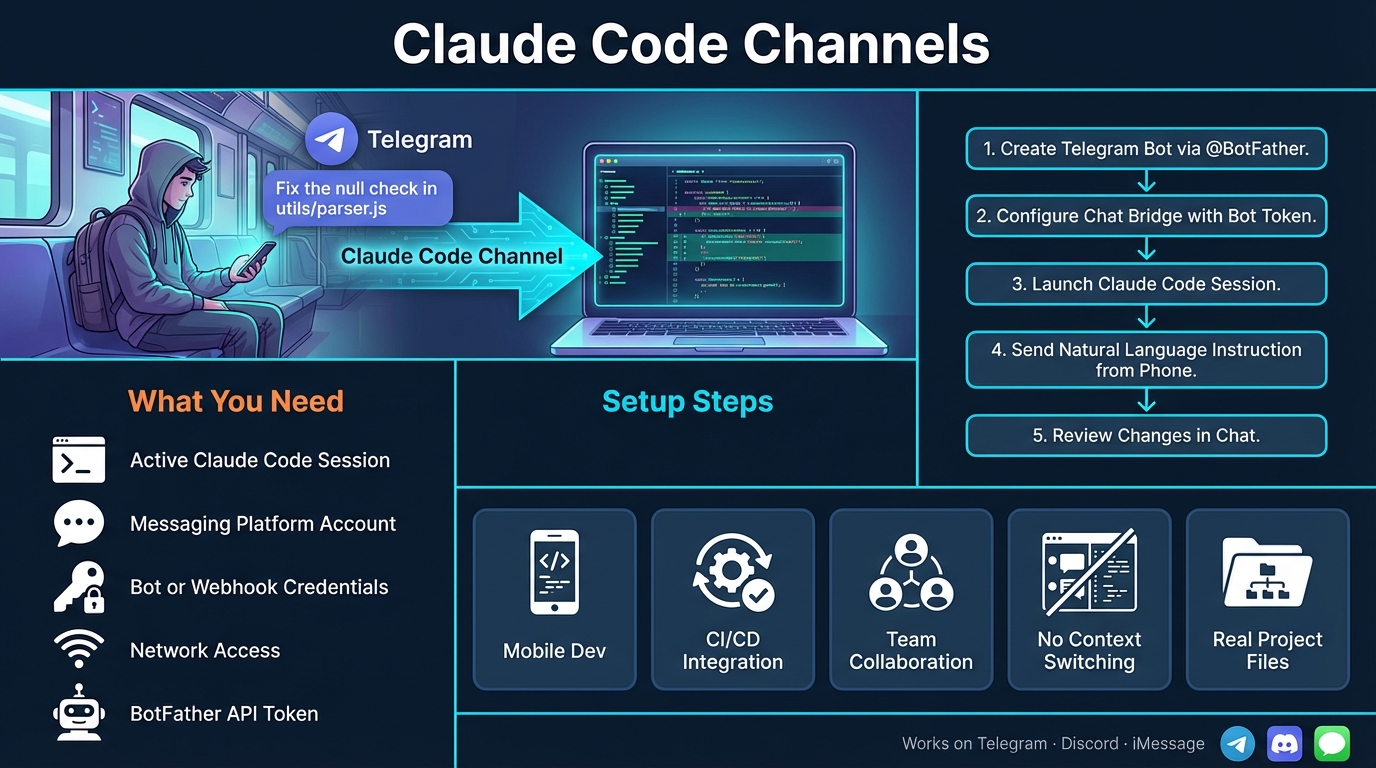
Imagine you're on the train, away from your laptop, and you suddenly realise there's a bug in production. What if you could simply send a Telegram message to your AI coding agent and have it fix the issue against your real project files? That's exactly what Claude Code Channels make possible.
Claude Code Channels are a feature within Anthropic's Claude Code that allow external systems — such as Telegram bots, Discord servers, and even iMessage — to push events directly into a running Claude Code session. According to a detailed write-up by Cyrus, this means you're no longer tethered to your terminal. You can message Claude Code from your phone, and it works against your real files. The feature arrives amid a broader trend of automating coding and software engineering workflows, as The Indian Express reports.
What You Need Before Getting Started
Before you set up Claude Code Channels, make sure you have the following in place:
- An active Claude Code session — Claude Code should be installed and running on your development machine or server.
- A messaging platform account — You'll need an account on Telegram, Discord, or iMessage, depending on which channel you want to use.
- Bot or webhook credentials — For Telegram, you'll need a bot token (created via BotFather). For Discord, you'll need a webhook URL or bot token for your server. iMessage setups may require a Mac-based relay.
- Network access — Your Claude Code session needs to be reachable by the messaging platform, either directly or through a tunnelling service.
Step-by-Step: Setting Up a Telegram Channel for Claude Code
Here's a practical, real-world example of how to connect Telegram to a running Claude Code session. This is one of the most popular setups because Telegram's Bot API is straightforward and free to use.
- Create a Telegram bot. Open Telegram, search for
@BotFather, and send the command/newbot. Follow the prompts to name your bot and receive an API token. - Configure the chat bridge. In your Claude Code project, set up a channel configuration that points to Telegram. You'll register your bot token and specify which chat or group ID should be linked to your session. This acts as the bridge between Telegram messages and Claude Code commands.
- Start your Claude Code session. Launch Claude Code as you normally would from your terminal. Ensure the channel listener is active — this is the component that receives incoming messages from Telegram and passes them into the session.
- Send a message from your phone. Open your Telegram bot chat on your mobile device and type a natural-language instruction, for example:
"Add input validation to the email field in signup.py and write a unit test for it."Claude Code receives this message, interprets it, and begins working on the actual files in your project directory. - Review the results. Claude Code will respond in the same Telegram chat with a summary of what it did — which files it changed, what code it wrote, and any issues it encountered. You can then follow up with further instructions or approve the changes.
The same general approach applies to Discord (using webhooks or a bot integration) and iMessage (which typically requires a Mac-based relay to bridge messages into the session), as described by Claude Fast's setup guides.
Key Benefits of Using Claude Code Channels
- Mobile development becomes real. You can instruct your AI agent to make changes, run tests, or investigate bugs from your phone — no laptop required.
- CI/CD webhook integration. Beyond chat platforms, channels can receive events from CI pipelines. A failed build can trigger Claude Code to automatically analyse the error and propose a fix.
- Team collaboration. By connecting Claude Code to a shared Discord server, multiple team members can interact with the same agent session, making it a collaborative tool rather than a solo one.
- Reduced context-switching. Instead of opening a terminal, navigating to a project, and typing commands, you stay in the messaging app you already use throughout the day.
- Works against real files. This isn't a simulation or sandbox. Claude Code Channels operate on your actual project directory, so the changes are immediately real and ready for review or commit.
Tips for Getting the Most Out of Channels
- Be specific in your messages. The more precise your instruction ("Fix the null check in
utils/parser.jsline 42"), the better the result. - Use channels for quick tasks. Channels shine for small-to-medium tasks: bug fixes, adding tests, refactoring a function. For large architectural changes, a full terminal session gives you more control.
- Secure your bot tokens. Treat your Telegram or Discord bot credentials like passwords. Anyone with access to your bot can send commands to your Claude Code session.
- Combine with version control. Always have your project under Git so you can review and revert any changes Claude Code makes through a channel.
Conclusion
Claude Code Channels represent a genuinely useful shift in how developers interact with AI coding agents — moving the conversation from a fixed terminal to wherever you happen to be. Whether you're using Telegram on your commute or a Discord server with your team, the ability to push real instructions into a live coding session opens up practical new workflows.
If you're interested in bringing AI tools like Claude Code into your business or development team, Brain.mt can help. Get in touch for more information about our AI services, or ask about our dedicated workshops and training sessions on this subject — we'll help you and your team get up to speed quickly and confidently.