What Happened: Claude Moves Beyond the Chat Window
Anthropic has released Claude Cowork as a research preview, and it represents a significant shift in how people interact with AI. Rather than simply chatting back and forth in a conversation window, Cowork brings the agentic capabilities of Claude Code — previously aimed at software developers — directly into the Claude Desktop application for everyday knowledge work.
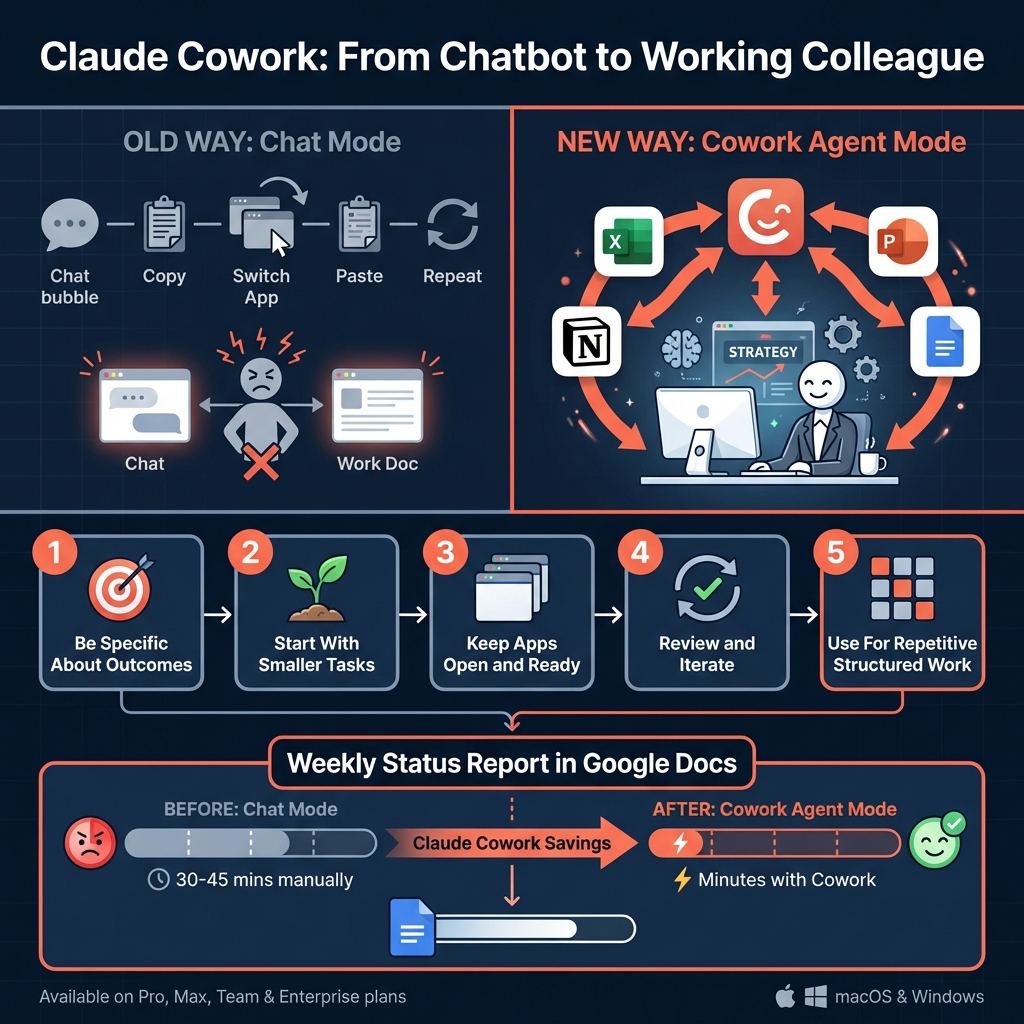
According to the Claude Help Centre, Cowork is available on paid plans including Pro, Max, Team, and Enterprise, and runs on both macOS and Windows versions of Claude Desktop. Users need the latest version of the desktop application, which can be downloaded from claude.com/download.
As writer Marco Kotrotsos put it on Medium, there are now essentially two kinds of Claude users: those who chat, and those who let Claude do the work. The first group opens Claude, asks a question, gets an answer, and maybe copies it somewhere. The second group — Cowork users — lets the AI operate directly within the applications they already use every day.
Product management writer Aakash Gupta described Cowork in his complete guide as his favourite way to use Claude, noting that it functions as an agent that can work inside systems you control, including Excel, PowerPoint, Google Docs, and Notion.
Why It Matters: From Answering Questions to Doing the Job
The distinction between a chatbot and an agent is not a small one. When you use a traditional AI chat interface, you are the one doing the work. You ask a question, read the response, copy relevant parts, switch to another application, paste, format, and repeat. The AI is a reference tool — useful, but passive.
Cowork changes this dynamic entirely. Instead of you shuttling information between Claude and your work applications, Claude operates within those applications on your behalf. Need a spreadsheet analysis done in Excel? A presentation drafted in PowerPoint? A project brief assembled in Google Docs? Cowork can handle these tasks directly, working in the actual software rather than generating text for you to manually transfer.
This matters for professionals because it removes what has always been the biggest friction point with AI assistants: the gap between getting a good answer and actually implementing it. According to Kotrotsos, the old model — chat, copy, paste, close — is limiting. Cowork closes that gap by turning Claude from a conversational partner into a working colleague.
For teams and organisations, the implications are practical and immediate. Knowledge workers spend enormous amounts of time on document creation, data organisation, and presentation building. Having an AI agent that can handle the execution — not just the thinking — within familiar tools means that people can focus on decisions, strategy, and the kind of work that genuinely requires human judgement.
Best Practices: Getting the Most from Cowork
Productivity author Chris Bailey published a set of practical tips for using Claude Cowork, and the broader community has been sharing advice since the feature launched. Based on the available guidance, here are several best practices worth adopting:
- Be specific about your desired outcome. Rather than asking Claude to "make a spreadsheet," describe what the spreadsheet should contain, how it should be structured, and what its purpose is. The more context you provide, the better the result.
- Start with smaller tasks. If you are new to Cowork, begin with contained jobs — formatting a document, building a simple table, drafting a one-page brief — before moving to complex multi-step projects.
- Keep your desktop applications open and ready. Cowork operates within your actual applications, so make sure the relevant software is running and accessible before you give Claude its instructions.
- Review and iterate. Cowork is a research preview, which means it is still being refined. Treat the first output as a strong draft rather than a finished product. Review what Claude produces, then ask for adjustments.
- Use it for repetitive, structured work. Cowork excels at tasks that follow clear patterns — building reports from data, formatting documents to a template, populating slides with content. These are the jobs where it saves the most time.
The Claudia + AI newsletter published a starter guide with 30 example use cases, which gives a good sense of the breadth of tasks Cowork can handle.
A Practical Example: Building a Weekly Report in Google Docs
To make this concrete, imagine you are a project manager who needs to produce a weekly status report every Friday. Normally, you would open a Google Doc, type out section headings, summarise each project's progress, add any blockers or risks, and format the whole thing consistently. This takes 30 to 45 minutes.
With Cowork, you could instead give Claude an instruction like this:
"Open Google Docs and create a new weekly status report for the week of 17 March. Use our standard template with sections for Project Alpha, Project Beta, and Project Gamma. For each project, include a status summary, key milestones completed this week, upcoming deadlines, and any blockers. Mark Project Alpha as on track, Project Beta as at risk due to the delayed vendor delivery, and Project Gamma as completed. Format with our usual heading styles and add a summary table at the top."
Claude then works directly in Google Docs to produce the report. You review it, make any corrections or additions, and you are done in a fraction of the time. The key is that you are not copying and pasting from a chat window — the work happens in the application itself.
What Comes Next
Cowork is currently labelled as a research preview, which signals that Anthropic considers it a work in progress. This means users should expect ongoing improvements, expanded capabilities, and possibly broader application support over time. The fact that it is already available across Pro, Max, Team, and Enterprise plans suggests that Anthropic is serious about making agentic AI a core part of the Claude experience for paying users.
For businesses, the takeaway is clear: the AI tools of 2026 are not just answering questions — they are doing work. Professionals who learn to direct these agents effectively will have a meaningful advantage in productivity and output quality. Those who continue using AI only as a search-and-chat tool will be leaving significant value on the table.
The shift from chatting with AI to working alongside it is well underway. Cowork is one of the clearest examples yet of what that shift looks like in practice.
Ready to Put AI to Work in Your Business?
At Brain.mt, we help businesses adopt AI tools like Claude Cowork in ways that make a real difference to daily operations. Whether you are exploring agentic AI for the first time or looking to roll it out across your organisation, we can help. Contact us for more information, or ask about our dedicated workshops and training sessions on this subject — designed to get your team confident and productive with the latest AI capabilities.